Skip to content

DROSE

Every drop of the night, ready to post.

Automatic editing for event video. It syncs the cameras to the sound, finds every drop and exports finished 9:16 and 4:5 clips: cut to the beat, with cinematic color and normalized audio.

Beta for Windows 10 and 11 · Mac in testing · Local processing · First night free

One drop in three formats. Illustration; the clips are generated from each event's own footage.

Analysis of a night in three bands: bass in blue, mids in amber, highs in white. Each mark is a detected drop.

For filmmakers and production companies covering parties, clubs and festivals with several cameras, where every drop is still edited by hand.

50+10 min8 h+ drops in a 3-hour setof manual editing per dropof work after the event

DROSE automates the whole process, from the raw footage to the exported clip. When it finishes, every drop is ready to review.

The whole night in one view.

At the top, the sound of the whole event and the recording of every camera. On the left, the stages of the process, each with its own settings.
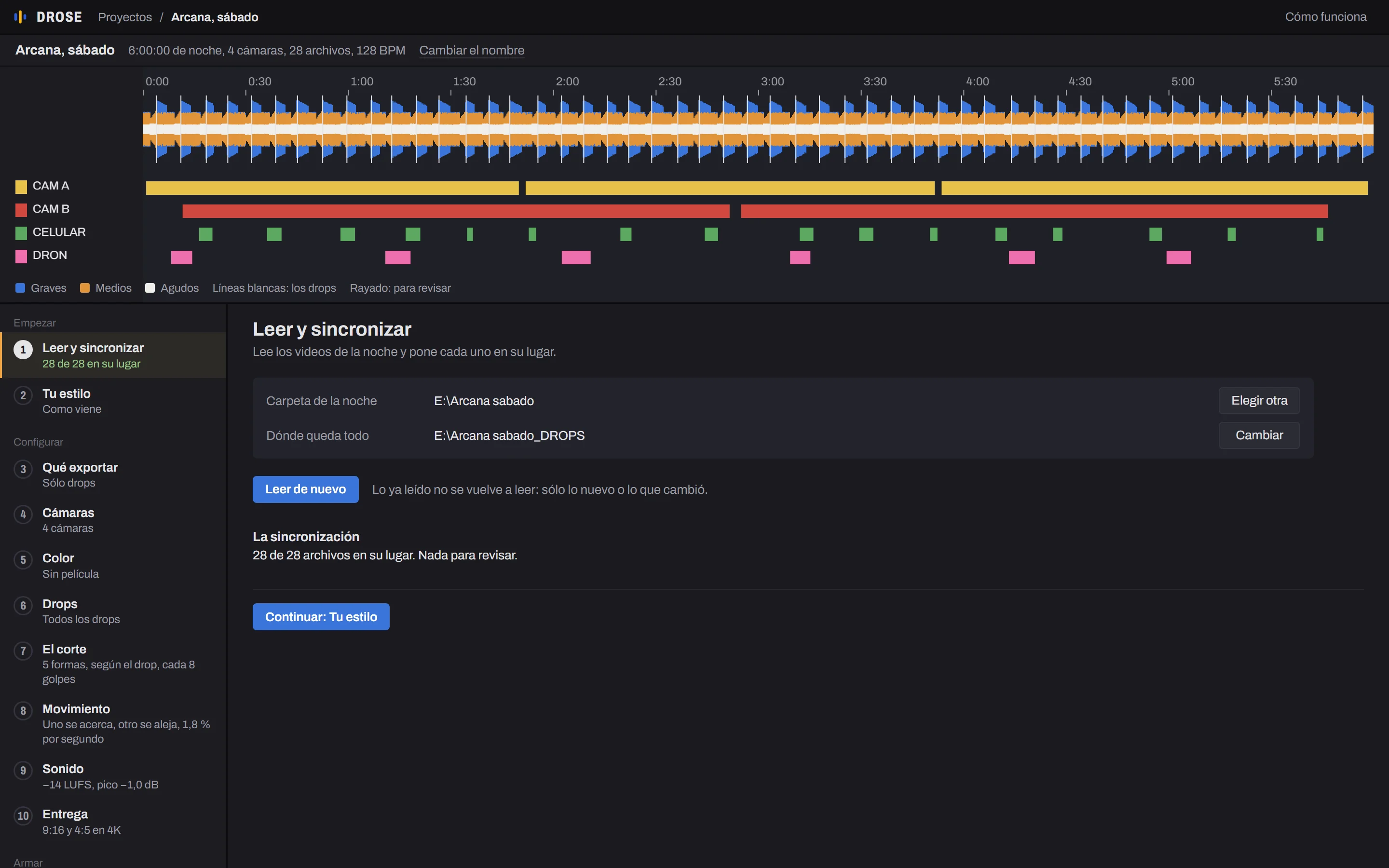
The program with a 6-hour night: the sound in three bands, the four cameras on their tracks, the stages on the left and the sync of every file

Screenshot of the program with a sample night.

From raw footage to finished clip.

  1. ImportTakes the folder exactly as it comes off the cards, even from an external drive: cameras, drones, phones and the audio recorder. It separates each camera on its own, even when they are mixed together. Each file is analyzed only once, even with 1.5 TB volumes.
  2. SyncPlaces every file on the timeline using audio, recording time and light changes. With audio, the error is under 10 ms. Doubtful files are flagged and not used.
  3. Drop detectionAnalyzes the bass bar by bar, marks every drop and suggests the best one of each track. If only the drops were filmed, each clip yields its own.
  4. Cutting to the beatEdits in bars, not seconds: 6 bars before the drop and 10 after, with every cut 2 frames ahead of the hit. Five cutting styles, chosen by how hard each drop hits. Each camera is picked for what it shows.
  5. ExportCinematic color, audio at −14 LUFS and reframing for 9:16 and 4:5, in 4K. Review each drop first or render everything straight away. Optional: the full set in 16:9 and the project for DaVinci Resolve or Premiere Pro.

Control at every stage.

Every stage shows what it does and why. It can run automatically, within set limits, or fully manual.
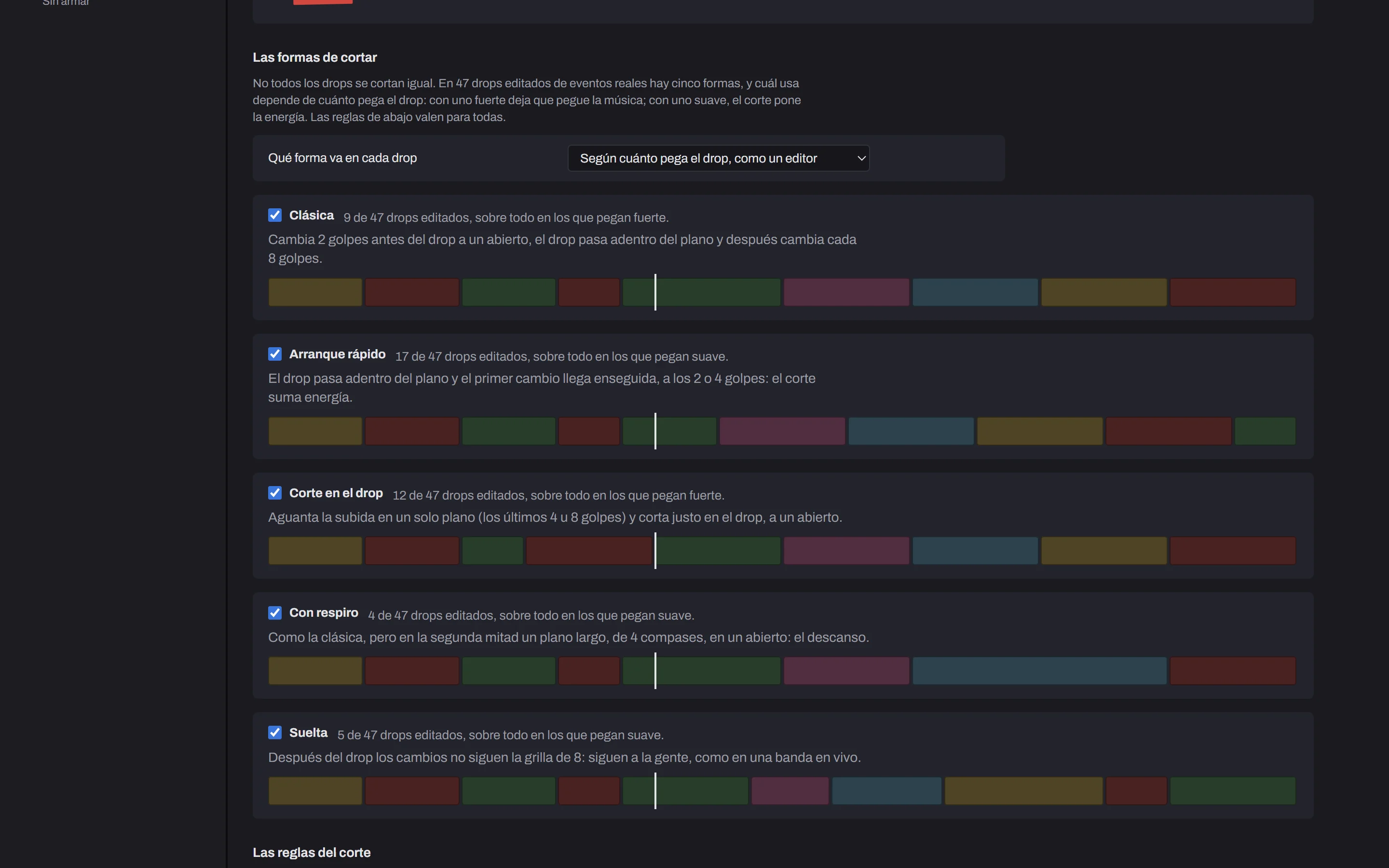
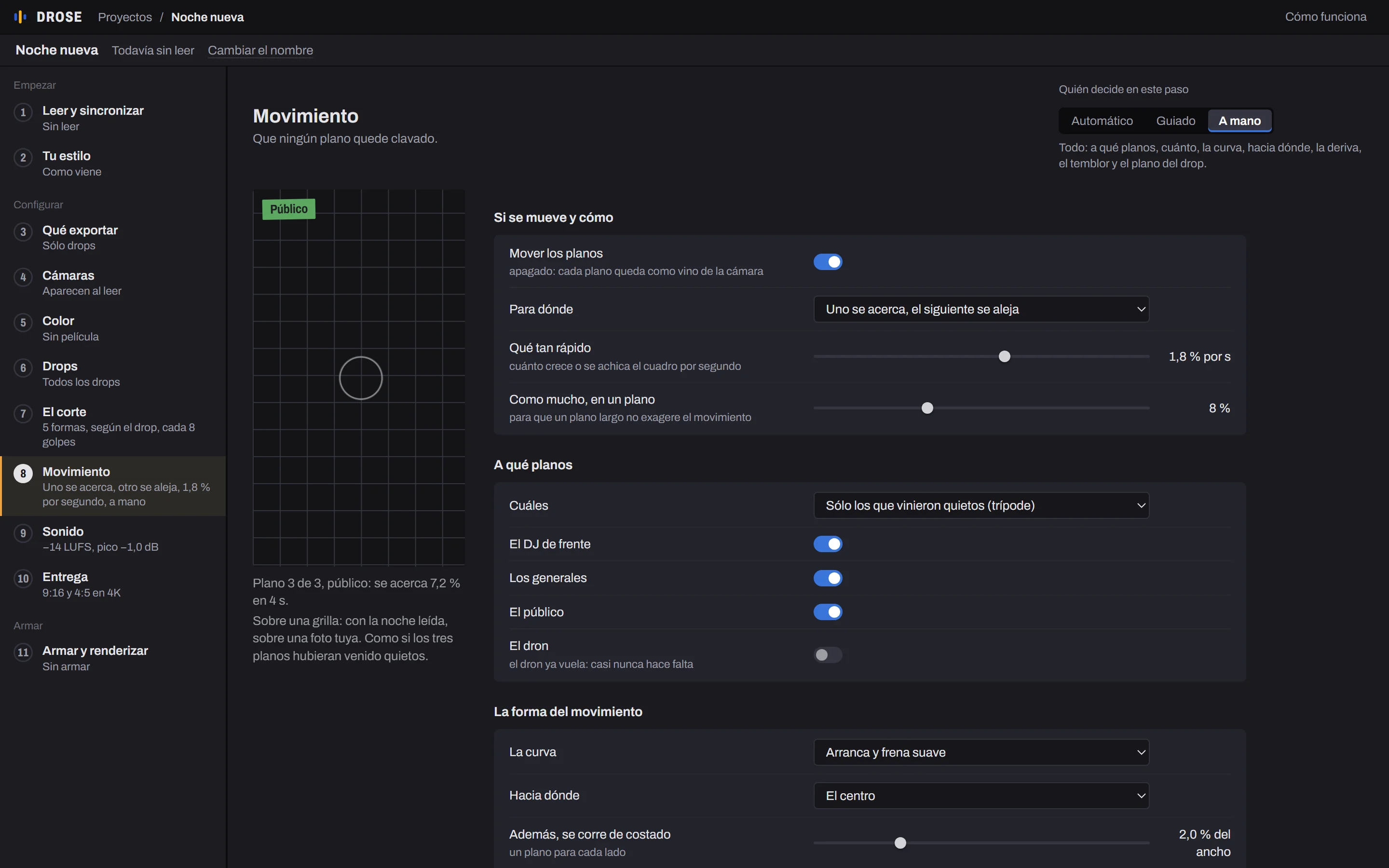
The Cut stage: the five cutting styles, each with a sample drop, and how often each appears across 47 edited drops

Screenshots of the program with no footage loaded; a sample is shown where the cameras would be. The program's interface is currently in Spanish.

Finished clips, not rough drafts.

Other tools hand you a rough cut to finish in another editor. DROSE delivers the finished drop, explains every decision and lets you change it.

Explained decisions

Every shot says why it was chosen. Any decision can be changed.

Applies the factory rules, measured on 56 edited drops from real events.

Three levels of control

Every stage works in automatic, guided or manual mode.

Five cutting styles

Measured on 47 edited drops. Each drop uses the one that fits how hard it hits, so they aren't all cut the same way.

Live editing

Cuts snap to the beat as you drag them. Camera, framing and color of every shot can be changed with an instant preview, before exporting.

Learns a style

From ten edited drops it measures duration, cutting rhythm, color and loudness, and applies that style to automatic mode.

Protected versions

Every new version keeps the previous one, dated. If a result isn't reliable, it says so.

One cinematic look for the whole night.

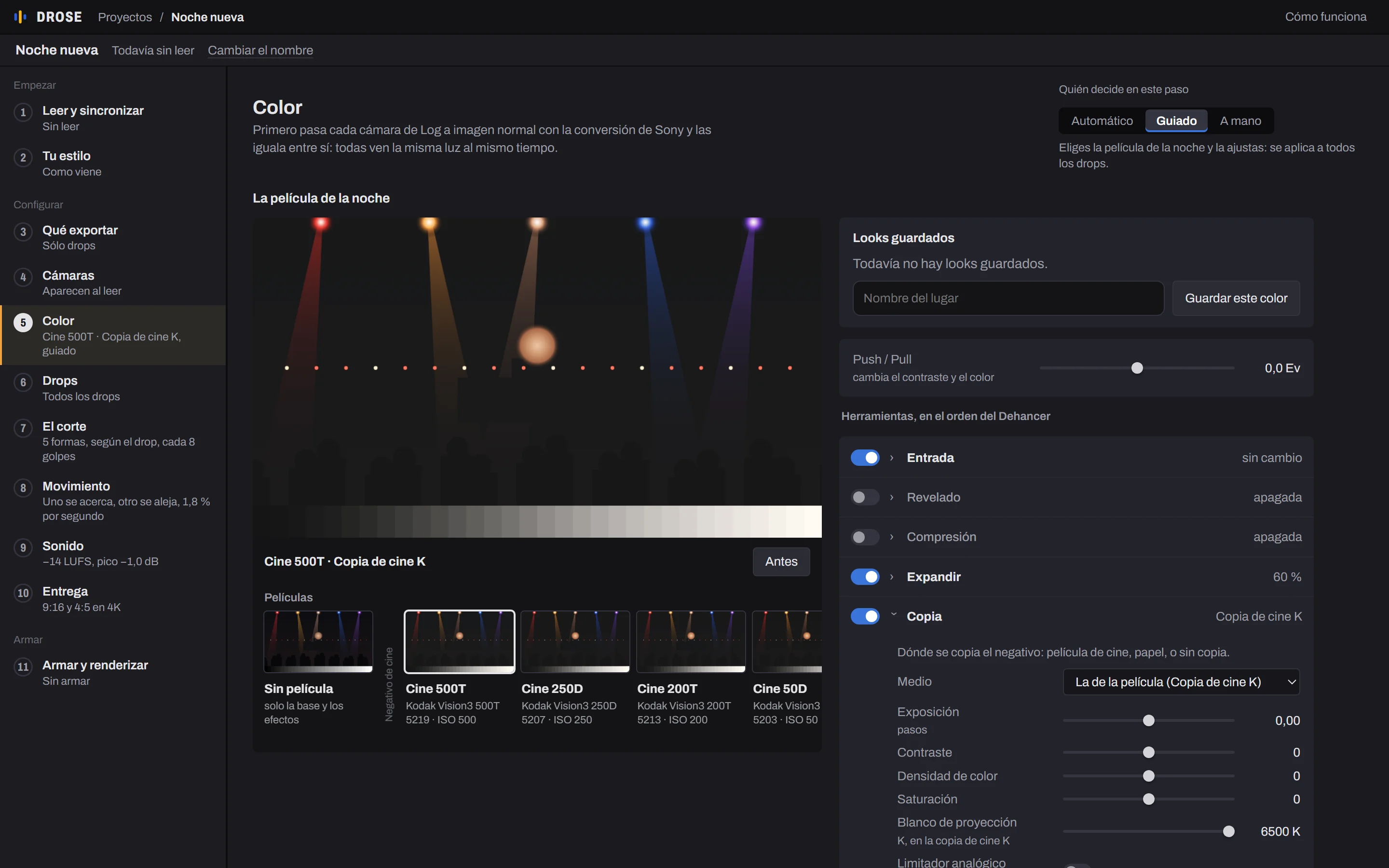
You pick a look, an analog film emulation with its own color curve, halation and grain, once per venue, and it is applied to every drop of the night. First, each camera is converted from Log to a normal image and matched to the others, so the color stays consistent.

  • 29 looks based on cinema and photo negatives, slide film and black and white.
  • Halation, bloom, grain, gate breathing and weave, like 8, 16, 35 or 65 mm film.
  • Sony S-Log3 is converted and goes straight into the look, just like with a camera profile.
  • It is saved under the venue's name for the next night and exported as a .cube LUT for Premiere or DaVinci.
Look:
0.0
+0.30

Measured performance

3 hof analysis for 1.5 TB of 4K footage from an internal drive, done once.
10 msmaximum error in audio sync.
58 sto render each drop in 4K, per format, from XAVC Intra.
100+clips from real events analyzed, with over 500 cuts measured, to define the factory rules.

Measurements from internal tests. Times depend on the computer and the footage.

Everything is processed on your computer.

  • No uploadsAnalysis, sync and rendering all happen on your machine. It works offline and needs no account.
  • Hardware accelerationUses an NVIDIA, Intel or AMD graphics card (or Apple silicon, on Mac) when available; otherwise the CPU.
  • Works with any cameraSony S-Log3, HLG, phones and drones, whatever was filming that night. Cameras without audio are placed by time and by light.
  • Export to other editorsBesides the finished drops, it generates the multicam project for DaVinci Resolve or Premiere Pro.
  • Windows and MacWindows 10 and 11, 64-bit. Mac with Apple silicon (M1 or later), as a test version.

PricingBeta

Your first night is free, no card needed: you just create an account. These are beta prices.

Trial

Free

One full night, with every feature.

Bank transfer

USD 40per month

Or USD 400 per year. In dollars or pesos, from any bank in Argentina.

Credit card

USD 50per month

Or USD 500 per year. Coming soon.

One account per person, for up to two computers.

Download DROSE

Download for Windows Download for Mac

Beta · Windows 10 and 11 · 64-bit · Mac with Apple silicon (M1 or later): test version

The first time you open DROSE, you sign in with your account: your first night is free.

Open “DROSE-Instalador.exe” and choose Instalar (Install): it sets everything up by itself, opens DROSE and leaves an icon on the desktop.

If Windows shows “Windows protected your PC”, choose “More info” and “Run anyway”: it appears because the beta isn't signed yet.

On a Mac: open DROSE from Downloads (in Chrome, open DROSE-Mac.zip first). The first time, right-click DROSE and choose Open (or, in System Settings → Privacy & Security, “Open Anyway”). It installs itself in Applications, without asking for a password, and stays in the Dock.

System requirements

Operating system
Windows 10 or 11, 64-bit. Mac with Apple silicon (M1 or later), as a test version.
Download size
About 2 MB. During setup it downloads what it needs (Python, ffmpeg and libraries), about 2 GB, once.
Graphics card
Optional. With NVIDIA, Intel or AMD, rendering is faster.
Files
Original footage is read where it is, including from an external drive, and is never modified. Clips are written to a separate folder.
Account
An account to activate it. After that it works offline: it connects every now and then to renew the license.
Program language
Spanish. An English version is in the works.

Frequently asked questions

Is the footage uploaded to the internet?
No. The whole process happens on your computer. Original files are never modified: they are read where they are and the results are written to a separate folder.
How is it different from other tools?
It cuts in bars, not seconds, picks each camera by its content, matches the color between cameras and delivers the finished drop, not a rough draft. Everything is processed on your computer, with nothing uploaded to the cloud.
How much does it cost?
Your first night is free. After that, during the beta, it's USD 40 a month or USD 400 a year by bank transfer (Argentina). By card, USD 50 a month, charged in Argentine pesos.
Why do I need an account?
To activate DROSE on your computer. Your footage never goes through the account: everything is processed on your computer and, once activated, it works offline for several days.
How many computers can I use it on?
Up to two with the same account. You can disconnect one from your account to use another.
Do I need the audio from the mixer?
It's recommended: a recorder connected to the DJ's output all night. Without it, DROSE uses the cameras' audio.
Does it work if only the drops were filmed?
Yes. If the cameras only recorded the drops, for example vertically, and the audio of the whole night is on a separate recorder, each clip is placed by its sound and yields its drop. If a clip is shorter than the drop, the drop is shortened in whole bars.
How many cameras can a night have?
As many as there are. It separates each camera on its own, by its folder and by how each file was recorded, even when they come mixed together, and each one gets its own track in the night.
How is the color chosen?
You pick one of 29 looks based on analog film, with their halation and grain effects, and it is applied to every drop of the night. It's saved under the venue's name to reuse next time and exported as a LUT for Premiere or DaVinci.
What about cameras without audio?
They are placed by the file's timestamp and by light changes, which every camera records the same way. That's how drones get synced.
Can its decisions be changed?
Yes, all of them. Every stage works in automatic, guided or manual mode, and each drop can be edited live: cuts, cameras, framing and color.
What formats does it export?
Drops in 9:16 and 4:5, in 4K or 1080p. Optionally, the full set in 16:9 with chapters and the project for DaVinci Resolve or Premiere Pro.
Does it detect every drop?
It marks every one it finds and sets the doubtful ones aside for review. If one is missing, add it with a click on the waveform.
Can it learn an editing style?
Yes. From ten or more edited drops it measures duration, cutting rhythm, color and loudness, and automatic mode then follows that style.
Is there a Mac version?
Yes, as a test version, for Macs with Apple silicon (M1 or later). The most tested version is the one for Windows 10 and 11.
How long does a night take to process?
The longest stage is analysis: 1.5 TB of 4K footage takes about 3 hours from an internal drive. After that, each 4K drop exports in about a minute per format.